Plans & Pricing
Plans are the heart of your SaaS business. Each plan defines what features tenants get, how much they pay, and how often they're billed. Getting your plans right is crucial for your business success.
Accessing Plans
Go to SaaS Management → Plans in your left sidebar.
Watch the Video Tutorial
Creating a New Plan
- Go to SaaS Management → Plans
- Click "New Plan" (or "+" button)
- Fill in the plan details (explained below)
- Click Save
Plan Details
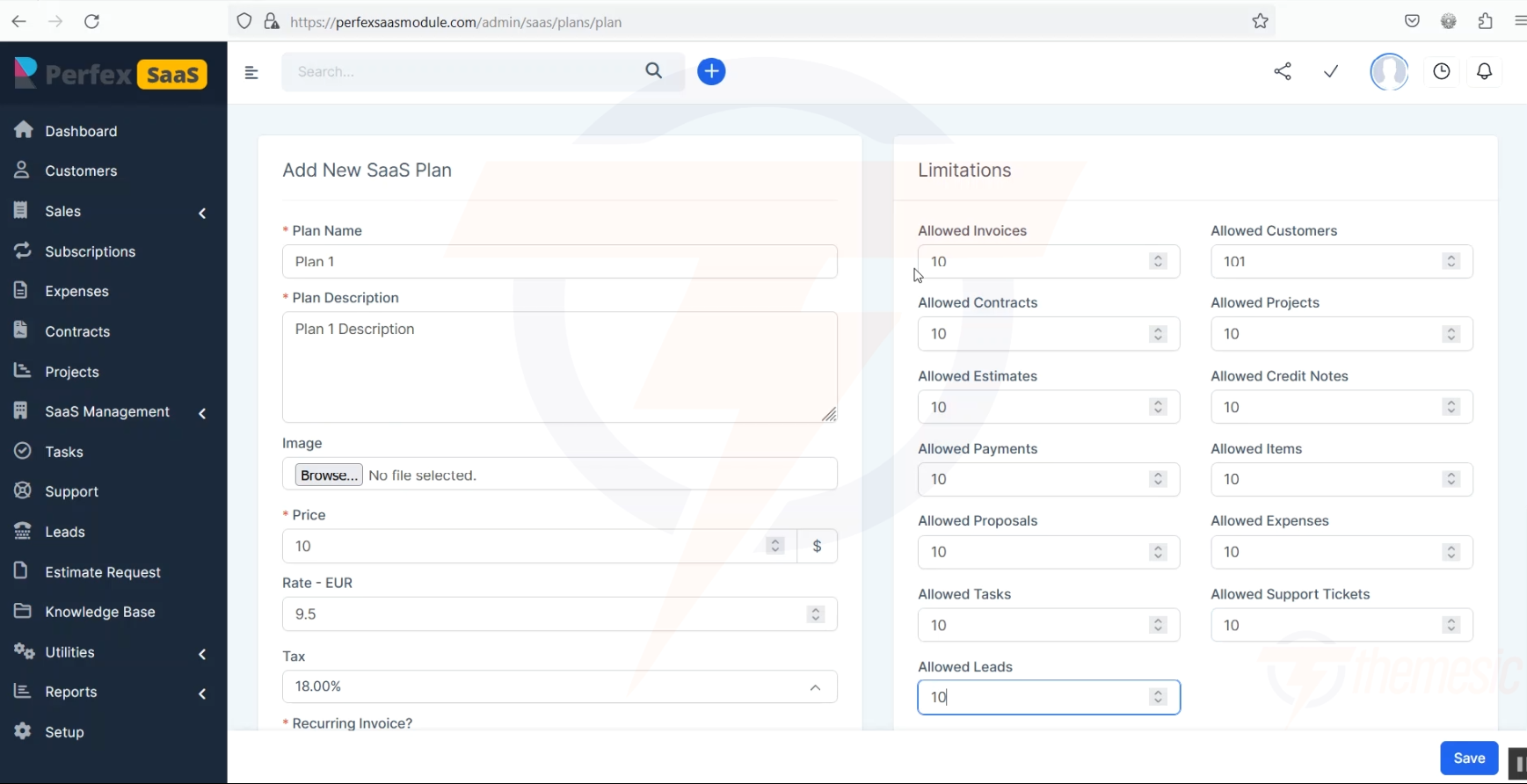 Creating a new subscription plan with all the options
Here's what each field means:
| Field | Description | Example |
|---|---|---|
| Plan Name | The name customers see | "Starter", "Professional", "Enterprise" |
| Plan Description | A short description of the plan | "Perfect for small businesses" |
| Monthly Price | What you charge per month | $10, $25, $50 |
| Annual Price | What you charge per year (offer a discount!) | $100/year ($96 = 20% off) |
| Billing Cycle | How often the customer is billed | Every 1 month, Every 3 months, Every 1 year |
| Mark as Most Popular | Highlights this plan on the pricing page | Toggle ON for your recommended plan |
| Enable Trial | Whether this plan includes a free trial | Toggle ON/OFF |
Pricing Strategy Tip: Most successful SaaS platforms use 3 plans - a Starter (affordable), a Professional (best value, marked as "Most Popular"), and an Enterprise (premium). The Professional plan should be your target - price it to be the obvious choice.
Payment Modes
Choose which payment gateways are available for this plan:
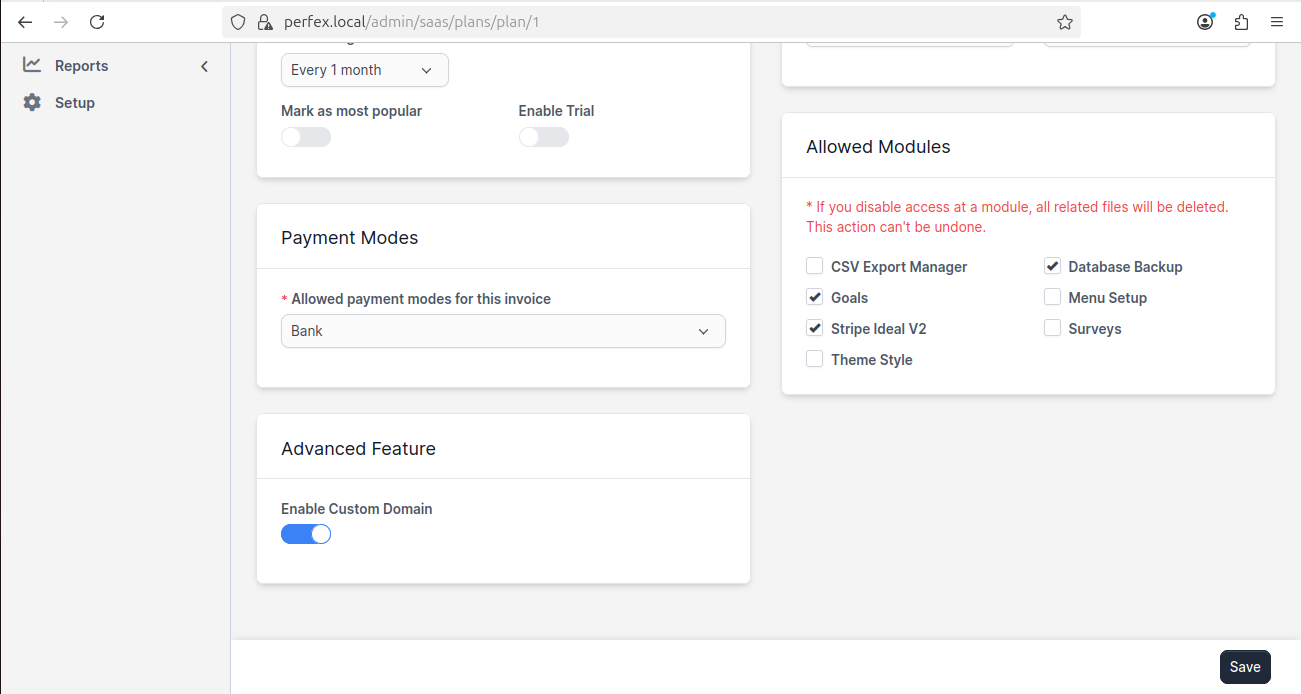 Configure payment methods, allowed modules, and advanced features for each plan
| Payment Mode | When to Use |
|---|---|
| Bank Transfer | For customers who prefer traditional payment |
| Stripe | For credit/debit card payments (most popular) |
| PayPal | For customers who prefer PayPal |
| Other gateways | Perfex CRM supports many payment gateways - all are available |
Make sure your payment gateways are configured in Perfex CRM first! Go to Setup → Payment Gateways and set up at least one payment method before creating paid plans.
Setting Usage Limits
Each plan can have usage limits (also called "quotas") that restrict how much a tenant can use. This is how you differentiate between plan tiers.
For detailed information, see Usage Limits & Quotas.
Quick Example: 3-Tier Pricing
Here's a common pricing structure:
| Feature | Starter ($10/mo) | Professional ($25/mo) | Enterprise ($50/mo) |
|---|---|---|---|
| Customers | 50 | 500 | Unlimited |
| Invoices | 100 | 1,000 | Unlimited |
| Projects | 5 | 50 | Unlimited |
| Staff Members | 2 | 10 | Unlimited |
| Estimates | 50 | 500 | Unlimited |
| Contracts | 10 | 100 | Unlimited |
| Tasks | 100 | 1,000 | Unlimited |
| Custom Domain | ❌ | ✅ | ✅ |
| Priority Support | ❌ | ❌ | ✅ |
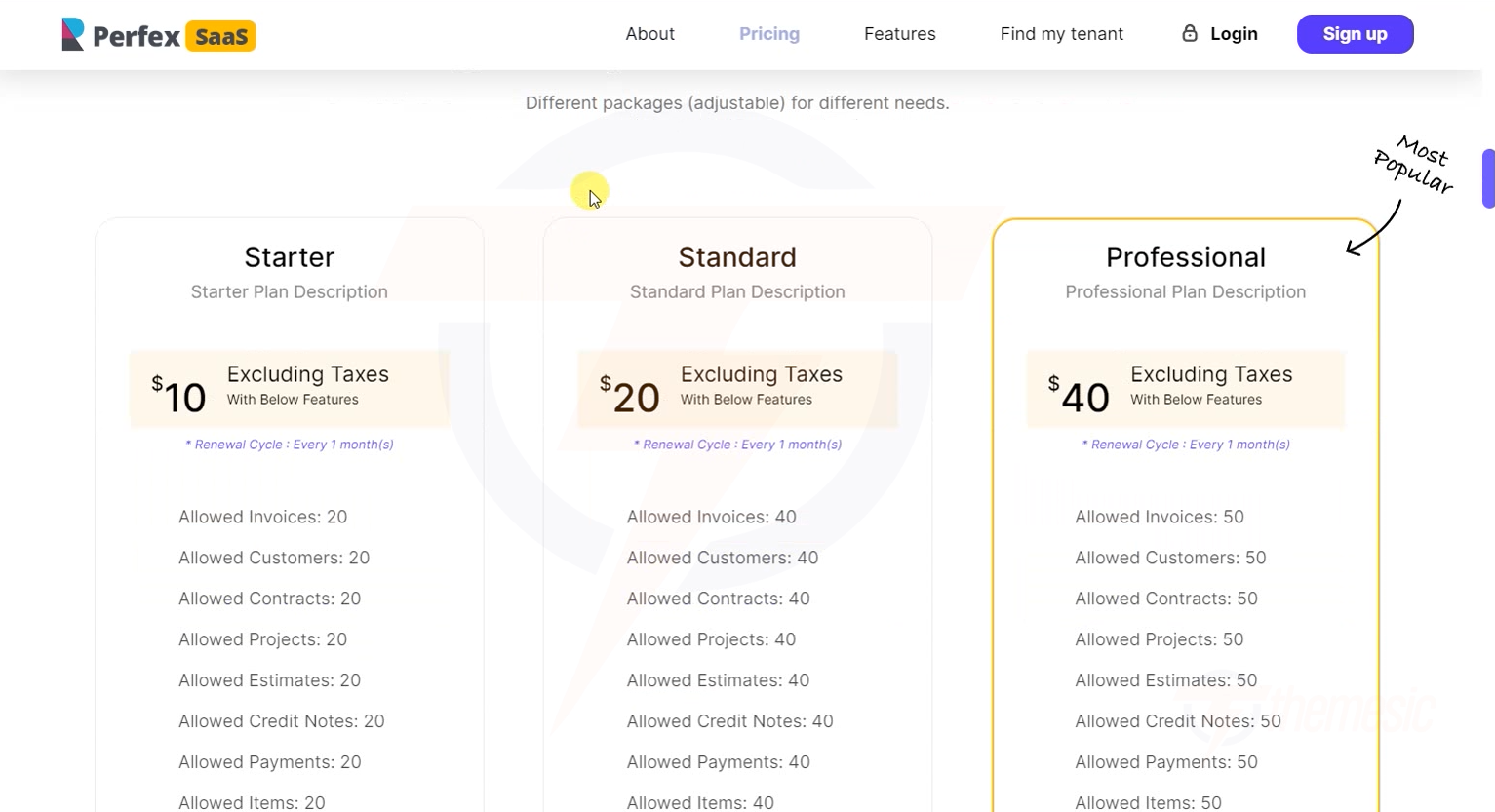 Your tenants see a beautiful pricing page with your plans laid out clearly
Allowed Modules
For each plan, you can control which Perfex CRM modules the tenant can access. This is a powerful way to create plan differentiation.
For example:
- Starter plan: Basic modules only (Customers, Invoices, Tasks)
- Professional plan: Add Projects, Estimates, Contracts
- Enterprise plan: Everything, including premium add-ons
See Module Access Control for detailed setup.
Advanced Features
Enable Custom Domain
Toggle this ON to allow tenants on this plan to use their own custom domain. This is typically reserved for higher-tier plans.
Enable Trial
Toggle this ON to give new subscribers a free trial period (the duration is set in Tenant Settings).
Plan Pricing Strategies
Here are proven pricing strategies for SaaS businesses:
Strategy 1: Tiered Pricing (Most Common)
- 3 plans: Starter, Professional, Enterprise
- Each tier adds more features and higher limits
- Mark the middle plan as "Most Popular"
Strategy 2: Usage-Based Pricing
- One plan, but charge based on usage (number of customers, invoices, etc.)
- Our module supports this through usage limits
Strategy 3: Freemium + Paid
- Offer a Free plan with very limited features
- Paid plans unlock more capacity and features
- Great for driving signups
Strategy 4: Annual Discount
- Offer monthly AND annual billing
- Give 15-20% discount for annual payment
- Improves your cash flow and reduces churn
Revenue Tip: Annual plans are your best friend. A customer paying $25/month can cancel any month. A customer paying $250/year (with a small discount) is locked in for a full year. Always encourage annual plans!
Editing and Deleting Plans
Edit a Plan
- Go to SaaS Management → Plans
- Click on the plan name
- Make your changes
- Click Save
Editing affects existing subscribers! If you change a plan's limits, existing tenants on that plan will be affected. Pricing changes only affect new subscriptions.
Delete a Plan
- Go to SaaS Management → Plans
- Click the delete button next to the plan
- Confirm the deletion
You cannot delete a plan that has active subscribers. Move existing tenants to a different plan first, then delete the empty plan.
Plans created? Excellent! Now set up Usage Limits & Quotas to fine-tune what each plan includes.