What Vertex Can Be
Vertex installs as one ready-made style — the industrial / MRO storefront. But the same sections and the color system flex to fit very different B2B verticals. This page shows what an auto-parts, office & IT, or print-supplies configuration of Vertex looks like, and walks you through the real, merchant-facing lever that gets you there.
There is one Vertex demo (industrial / MRO). The auto-parts, office & IT, and print looks below are not separate installable themes, and there is no URL preview — they're configurations you build from the same theme using one setting: the color palette. Each one is a starting point you set up in the theme editor, then customize to your brand.
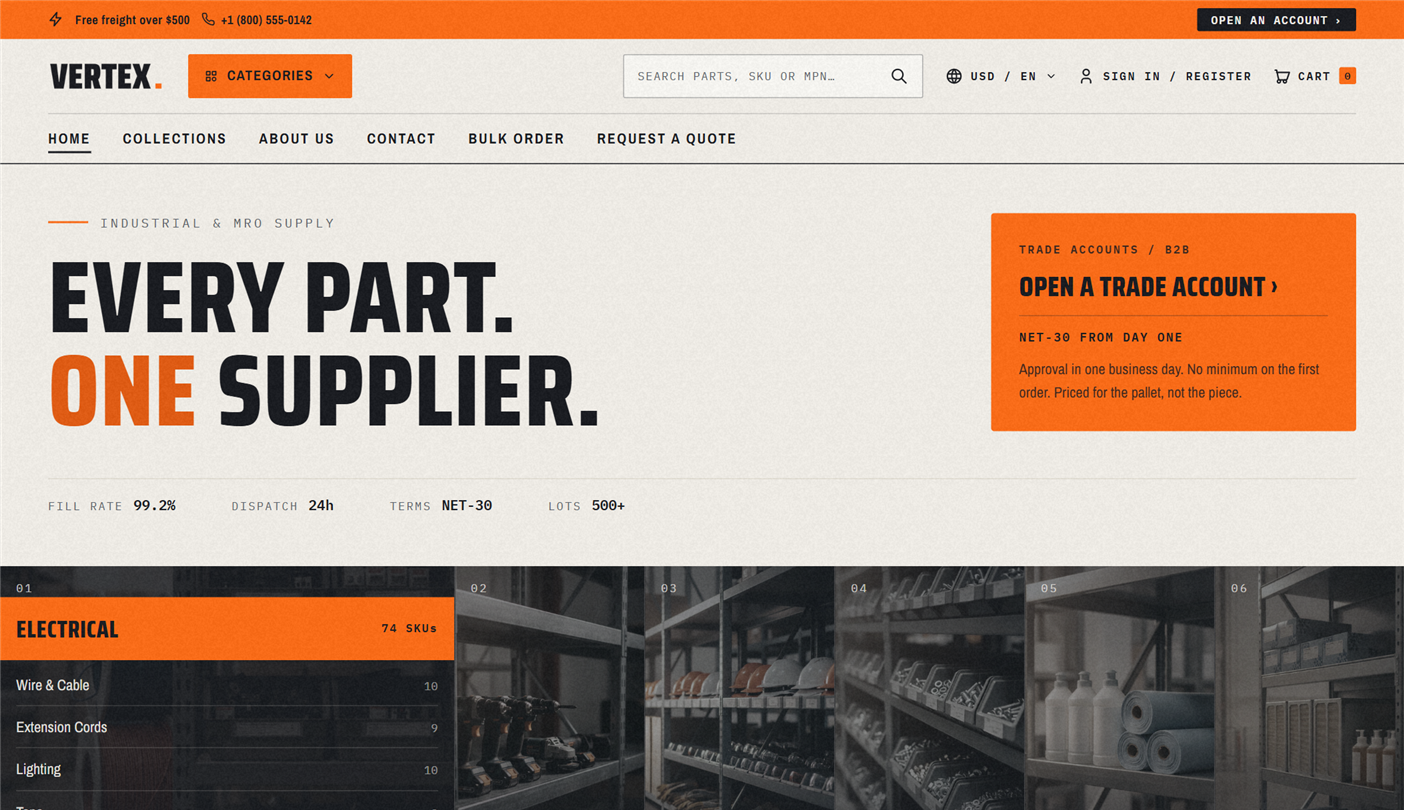
The default — Vertex (industrial / MRO)
This is what loads when you install Vertex.
| Industry | Industrial supply, MRO, hardware, fasteners, hand tools, fluids, abrasives |
| Accent color | Cobalt blue |
| Homepage hero | Bold typography + workshop / warehouse imagery |
| B2B hooks | "Volume pricing", "NET-30 available", "ISO 9001 certified", "24-hr dispatch" |
| Best for | Industrial distributors, MRO suppliers, fastener/hardware merchants, tool catalogs, JanSan |
The cobalt-blue accent maps to the crisp, professional industrial-distribution visual language procurement buyers recognize from the big B2B supply houses.
What Vertex can look like for other industries
Each look below is a configuration, not a separate theme — the same Vertex storefront, recolored with a color palette and reconfigured with the sections that matter for that vertical. You build it in the theme editor; there's no separate demo to install and no URL to preview.
Auto parts
| Industry | Auto parts, performance, aftermarket, OEM, motorcycle, marine, powersports |
| Accent color | Red-orange (color palette: Signal red) |
| Best for | Auto-parts distributors, performance shops, motorcycle / marine / RV / powersports |
| Color palette | Signal red |
Part-number predictive search and the bulk-order pad do the heavy lifting for fitment-driven buyers. The red-orange accent maps to a performance / automotive visual language.
Office & IT
| Industry | Office supplies, IT hardware, electronics, paper, monitors, keyboards, bulk consumables |
| Accent color | Blue (color palette: Office blue) |
| Best for | Office-supply distributors, IT resellers, electronics wholesalers, school / government supply |
| Color palette | Office blue |
Leads with bulk B2B office orders — the bulk-order pad, RFQ, and NET-30 surface prominently. The blue accent maps to the corporate IT / Quill / Staples Business Advantage language buyers expect.
Print supplies
| Industry | Print supplies, toner, ink cartridges, reprographics, copier consumables, label media |
| Accent color | Teal (color palette: Inkline teal) |
| Best for | Toner / ink resellers, reprographics shops, managed-print-service vendors |
| Color palette | Inkline teal |
Leads with consumables reordering — quick reorder and the bulk-order pad put repeat cartridge orders one click away. The teal accent reads clean and office-print, pairing well with the office & IT family while standing on its own.
The lever that gets you there
You don't install a separate look for these — you shape the single Vertex theme with one real, merchant-facing tool:
Starter color palette (recolor in one click)
Theme settings ▸ Colors ▸ Starter color palette flips one global accent through every button, pill, badge, link, focus ring, the B2B greeting bar, and hero CTAs:
- Custom — your own palette (manual color pickers below)
- Custom (cobalt blue by default) · Signal red · Office blue · Inkline teal
Save, and the whole storefront's accent flips instantly. For a fully custom brand color, pick Custom and set your own accent + "on accent" (text-on-accent) colors.
Which configuration fits you?
Pick the closest starting point, then shape Vertex to match (color palette + sections). You can override anything afterward.
| If you sell... | Closest configuration | Why |
|---|---|---|
| Fasteners, hand tools, lubricants, abrasives, hardware, general MRO | Vertex (default) | Industrial baseline; faceted filters and part-number search do the work |
| Auto, motorcycle, marine, RV, powersports parts | Auto parts (Signal red) | Deep part-number catalogs + predictive search fit fitment-driven buyers |
| Office, IT, electronics, copier supplies, school / government supply | Office & IT (Office blue) | Bulk B2B orders + corporate-IT visual language |
| Toner, ink, cartridges, reprographics, managed-print consumables | Print supplies (Inkline teal) | Quick reorder + the bulk pad make repeat consumable orders one click |
| Janitorial / sanitation (JanSan) | Vertex | The MRO baseline maps cleanly with no extra setup |
| Industrial chemicals / lubricants with datasheets | Vertex | Tech-spec tables and the documents block are core to Vertex |
| Wholesale-only (no B2C) | Vertex or Office & IT | Pick the accent that matches your brand; set Storefront mode to B2B-only |
Customizing
Whatever starting point you pick, everything is overrideable from the theme editor:
| Customize | How |
|---|---|
| Accent color | Theme settings ▸ Colors ▸ Starter palette ▸ Custom, then pick your own accent |
| Logo | Theme settings ▸ Logo — replace the demo logo with your own SVG or PNG |
| Homepage section order | Theme editor ▸ Home — drag to reorder, or add and remove sections |
| Hero / lifestyle imagery | Replace per-section via each section's Image picker |
| Typography | Theme settings ▸ Typography — heading font, body font, scale ratio |
| Copy and CTAs | Edit text inline in the theme editor for every section |
| Translations | Theme settings ▸ Languages — provide custom strings via the language editor |
Save your configured storefront as a named theme in Online Store ▸ Themes ▸ Theme library — useful for A/B tests or staging visual changes.
Related reading
- Overview — what Vertex is and what ships in v1.0
- Installation — install and pick your starter palette
- Theme settings reference — Colors ▸ Starter palette and accent settings
- Markets & multi-currency — works identically across all markets
- Storefront mode guide — Hybrid / B2B-only / B2C-only
- RFQ page guide — request-a-quote setup
Summary
- Vertex ships one ready-made style — industrial / MRO (cobalt blue).
- The auto-parts, office & IT, and print looks are configurations you build from that one demo using one lever: the color palette.
- They're not separate installable themes, and there's no URL preview — you set them up in the theme editor.
- Everything (accent, layout, imagery, copy) is overrideable from the theme editor.