Product Page
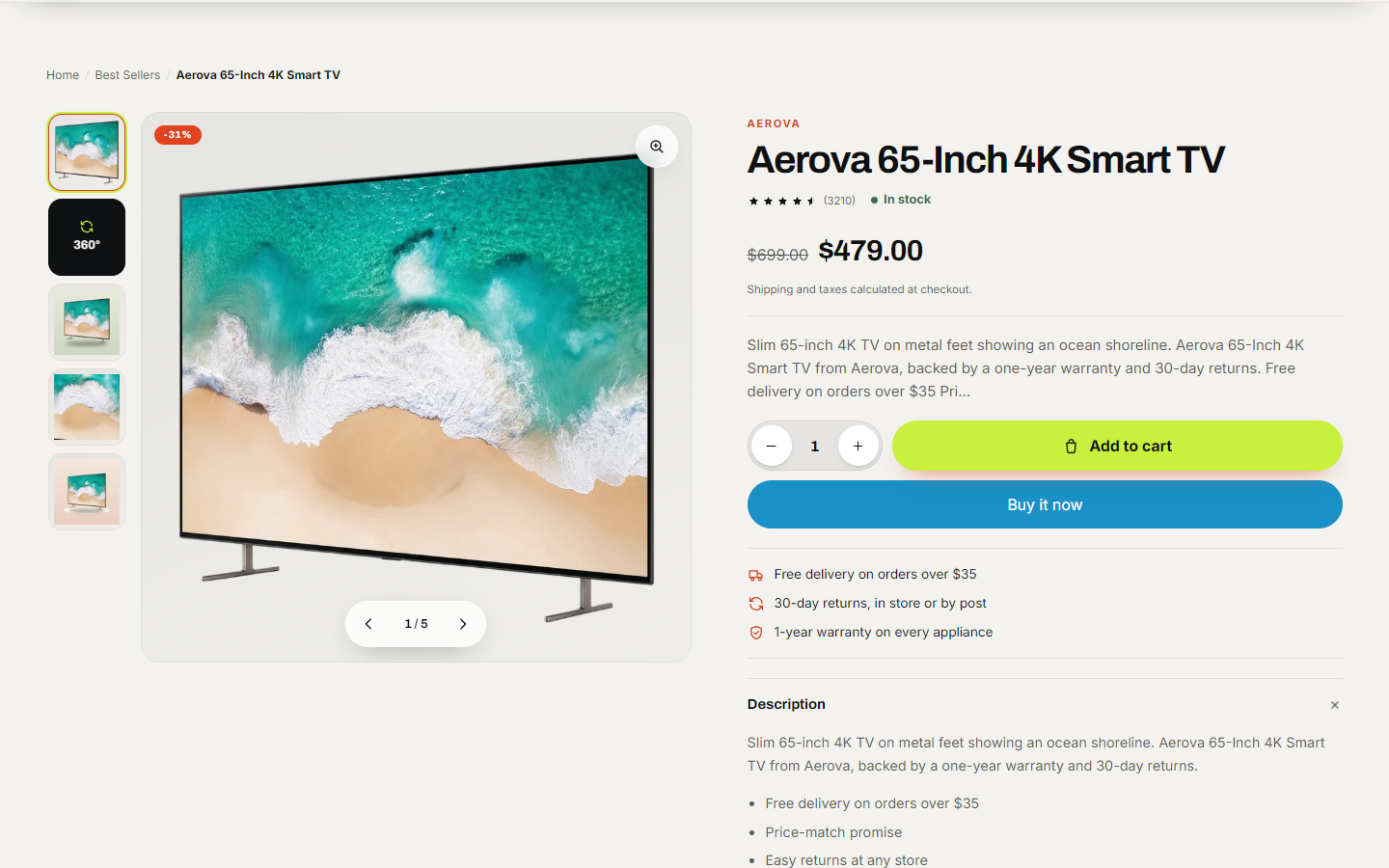
Product information section
The product information column is built from blocks. In the theme editor, open Product information to add, remove and drag blocks into any order.
| Block | What it shows |
|---|---|
| Brand | Vendor above the title |
| Title | Product title |
| Rating and stock | Stars with review count, and the stock message ("Only a few left" at 5 or fewer) |
| Price | Price, compare-at price, unit price, tax note and the Shop Pay Installments banner (setting: show installments) |
| Short description | First lines of the description (setting: length) |
| Variant picker | One button group per option. Show swatches uses the color or image set on each option value. Values that cannot be bought are crossed out. |
| Buy buttons | Quantity stepper, Add to cart and "Buy it now". For gift card products, also the recipient form |
| Pickup availability | Store pickup status for the selected variant |
| Complementary products | "Complete the setup" list (setting: heading, products to show) |
| SKU | Variant SKU |
| Perks | Three short lines with icons |
| Collapsible tab | A tab with your own text, a page, or the product description. Add as many as you need. |
| Share button | Native share on phones, copy link on desktop |
| Text | A short rich text note |
| Custom Liquid | Your own Liquid or HTML |
| Apps | Blocks from installed apps |
Unit prices
Products sold by weight or volume can show a price per unit, for example "$2.40/100ml". Set Unit price on the variant in Products > [product]. Departo shows it on the product page, product cards, the cart page and the cart drawer.
Pickup availability
When local pickup is on in Settings > Shipping and delivery > Local pickup, the block shows whether the selected variant can be picked up, with the usual ready time. "Check availability at N stores" opens the list of stores with address and phone. It updates when the customer picks another variant.
Gift cards sent to someone else
On gift card products the buy buttons include I want to send this as a gift. The customer enters the recipient email, an optional name, a message (200 characters max) and an optional send date. Turn it off with Show recipient form for gift cards on the Buy buttons block.
Complementary products
Complementary products come from Shopify's free Search & Discovery app. Open the app, choose a product and add its complementary products. The block stays hidden when a product has none.
Gallery
The gallery is automatic. It uses the media you add to the product in Products > [product] > Media.
- Thumbnails - vertical rail on desktop, horizontal row on phones
- Arrows and counter - "1 / 5" pill at the bottom of the main image
- Hover zoom - move the mouse over the image to see a 2.3x magnified lens
- Full-screen lightbox - click the image or the magnifier button. Click again to zoom in and move the mouse to pan. Arrow keys switch images, Esc closes.
- Swipe on phones
- Videos and 3D models play inside the gallery
- 360° view - see Product gallery and 360 view
When a variant has its own image, choosing that variant switches the gallery to it.
Product recommendations
Shows related products under the product information. Settings: eyebrow, heading, products to show.